请注意,本文编写于 179 天前,最后修改于 51 天前,其中某些信息可能已经过时。
目录
在前端项目里,大文件上传不是单一功能,而是文件体积超过 100MB / 受限于浏览器 / 服务器单文件大小限制时必须处理的场景,核心特征是:文件大、上传慢、易中断、对稳定性要求高。请看下面一个大文件上传的案例演示
项目文件说明
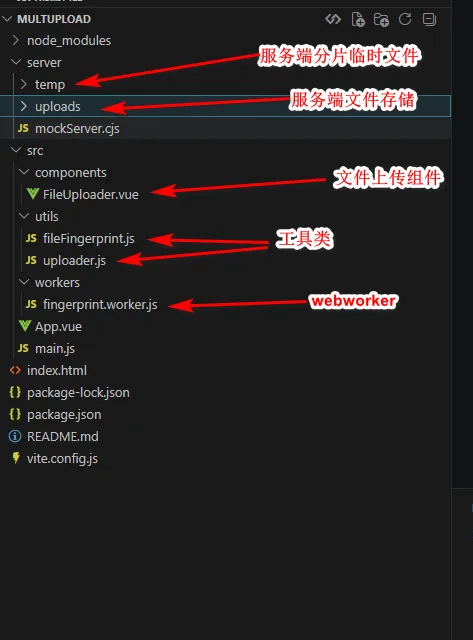
客户端项目代码
package.json
{
  "name": "multupload-demo",
  "private": true,
  "version": "1.0.0",
  "type": "module",
  "scripts": {
    "dev": "vite",
    "build": "vite build",
    "preview": "vite preview"
  },
  "dependencies": {
    "vue": "^3.4.21",
    "spark-md5": "^3.0.2",
    "axios": "^1.6.8"
  },
  "devDependencies": {
    "@vitejs/plugin-vue": "^5.0.4",
    "vite": "^5.2.0"
  }
}
App.vue
vue<template>
  <div class="app">
    <h1>大文件上传演示</h1>
    <FileUploader />
  </div>
</template>

<script setup>
import FileUploader from './components/FileUploader.vue'
</script>

<style>
* {
  margin: 0;
  padding: 0;
  box-sizing: border-box;
}

body {
  font-family: -apple-system, BlinkMacSystemFont, 'Segoe UI', Roboto, Oxygen, Ubuntu, Cantarell, sans-serif;
  background: #f5f5f5;
  min-height: 100vh;
}

.app {
  max-width: 1200px;
  margin: 0 auto;
  padding: 20px;
}

h1 {
  text-align: center;
  color: #333;
  margin-bottom: 30px;
}
</style>
FileUploader.vue
vue<template>
  <div class="uploader-container">
    <!-- 上传区域 -->
    <div
      class="upload-area"
      :class="{ 'drag-over': isDragOver, 'uploading': isUploading }"
      @drop.prevent="handleDrop"
      @dragover.prevent="isDragOver = true"
      @dragleave.prevent="isDragOver = false"
      @click="triggerFileInput"
    >
      <input
        ref="fileInput"
        type="file"
        style="display: none"
        @change="handleFileSelect"
      />
      <div class="upload-content">
        <div class="upload-icon">📁</div>
        <p class="upload-text">
          {{ isUploading ? '上传中...' : '点击或拖拽文件到此处上传' }}
        </p>
        <p class="upload-hint">支持大文件上传,支持断点续传和秒传</p>
      </div>
    </div>

    <!-- 配置区域 -->
    <div class="config-section">
      <h3>指纹计算策略</h3>
      <div class="strategy-options">
        <label
          v-for="option in strategyOptions"
          :key="option.value"
          class="strategy-option"
          :class="{ active: selectedStrategy === option.value }"
        >
          <input
            type="radio"
            v-model="selectedStrategy"
            :value="option.value"
            :disabled="isUploading"
          />
          <span class="option-title">{{ option.label }}</span>
          <span class="option-desc">{{ option.description }}</span>
        </label>
      </div>
    </div>

    <!-- 文件列表 -->
    <div class="file-list" v-if="fileList.length > 0">
      <h3>上传列表</h3>
      <div
        v-for="(item, index) in fileList"
        :key="index"
        class="file-item"
        :class="item.status"
      >
        <div class="file-info">
          <div class="file-name">{{ item.file.name }}</div>
          <div class="file-meta">
            <span class="file-size">{{ formatFileSize(item.file.size) }}</span>
            <span class="file-strategy" :title="'指纹策略: ' + getStrategyName(item.strategy)">
              🔐 {{ getStrategyName(item.strategy) }}
            </span>
          </div>
          <div v-if="item.totalDuration > 0" class="file-timing">
            <span class="timing-item" title="计算文件指纹耗时">
              🔍 {{ formatDuration(item.fingerprintDuration) }}
            </span>
            <span class="timing-separator">|</span>
            <span class="timing-item" :class="{ 'instant': item.isInstant }" title="文件上传耗时">
              ⬆️ {{ formatDuration(item.uploadDuration) }}
            </span>
            <span class="timing-separator">|</span>
            <span class="timing-item timing-total" title="总耗时">
              ⏱️ {{ formatDuration(item.totalDuration) }}
            </span>
          </div>
        </div>

        <div class="file-status">
          <span class="status-badge" :class="item.status">
            {{ getStatusText(item.status) }}
          </span>
          <span v-if="item.isInstant" class="instant-badge">⚡ 秒传</span>
        </div>

        <div class="file-progress">
          <div class="progress-bar">
            <div
              class="progress-fill"
              :style="{ width: item.progress + '%' }"
              :class="{ 'instant': item.isInstant }"
            ></div>
          </div>
          <span class="progress-text">{{ item.progress }}%</span>
        </div>

        <div class="file-actions">
          <button
            v-if="item.status === 'uploading'"
            @click="pauseUpload(item)"
            class="btn btn-warning"
          >
            暂停
          </button>
          <button
            v-if="item.status === 'paused'"
            @click="resumeUpload(item)"
            class="btn btn-primary"
          >
            继续
          </button>
          <button
            v-if="['pending', 'error', 'paused'].includes(item.status)"
            @click="startUpload(item)"
            class="btn btn-primary"
          >
            开始
          </button>
          <button
            v-if="item.status === 'uploading'"
            @click="cancelUpload(item)"
            class="btn btn-danger"
          >
            取消
          </button>
          <button
            @click="removeFile(index)"
            class="btn btn-text"
          >
            移除
          </button>
        </div>

        <div v-if="item.hash" class="file-hash">
          文件指纹: {{ item.hash.substring(0, 16) }}...
        </div>

        <div v-if="item.duration > 0" class="file-duration">
          上传耗时: {{ formatDuration(item.duration )}}
        </div>
      </div>
    </div>

    <!-- 日志区域 -->
    <div class="log-section" v-if="logs.length > 0">
      <h3>上传日志</h3>
      <div class="log-list">
        <div
          v-for="(log, index) in logs"
          :key="index"
          class="log-item"
          :class="log.type"
        >
          <span class="log-time">{{ log.time }}</span>
          <span class="log-message">{{ log.message }}</span>
        </div>
      </div>
    </div>
  </div>
</template>

<script setup>
import { ref, reactive } from 'vue'
import { LargeFileUploader, UploadStatus } from '../utils/uploader'
import { FingerprintStrategy } from '../utils/fileFingerprint'

const fileInput = ref(null)
const isDragOver = ref(false)
const isUploading = ref(false)
const selectedStrategy = ref(FingerprintStrategy.CHUNK_SAMPLING)
const fileList = reactive([])
const logs = reactive([])

const strategyOptions = [
  {
    value: FingerprintStrategy.FULL,
    label: '全量指纹',
    description: '计算整个文件的MD5,最准确但最慢'
  },
  {
    value: FingerprintStrategy.SIZE_HEAD,
    label: '大小+头部',
    description: '文件大小+前4KB,速度快但可能冲突'
  },
  {
    value: FingerprintStrategy.SIZE_HEAD_TAIL,
    label: '大小+头尾',
    description: '文件大小+前后各4KB,平衡速度和准确性'
  },
  {
    value: FingerprintStrategy.CHUNK_SAMPLING,
    label: '分片采样',
    description: '每个分片前4KB,推荐用于大文件'
  },
  {
    value: FingerprintStrategy.SIZE_NAME_PATH,
    label: '大小+名称+路径',
    description: '文件大小+文件名+路径,速度最快但冲突率最高'
  }
]

const triggerFileInput = () => {
  fileInput.value?.click()
}

const handleFileSelect = (e) => {
  const files = Array.from(e.target.files)
  addFiles(files)
  e.target.value = ''
}

const handleDrop = (e) => {
  isDragOver.value = false
  const files = Array.from(e.dataTransfer.files)
  addFiles(files)
}

const addFiles = (files) => {
  files.forEach(file => {
    const item = {
      file,
      uploader: null,
      status: UploadStatus.PENDING,
      progress: 0,
      hash: '',
      isInstant: false,
      // 时间记录
      startTime: null,
      endTime: null,
      fingerprintStartTime: null,
      fingerprintEndTime: null,
      uploadStartTime: null,
      // 耗时统计
      fingerprintDuration: 0,
      uploadDuration: 0,
      totalDuration: 0,
      strategy: selectedStrategy.value
    }
    fileList.push(item)

    // 自动开始上传
    startUpload(item)
  })
}

const startUpload = async (item) => {
  if (item.uploader && item.status === UploadStatus.UPLOADING) return

  // 记录总开始时间
  item.startTime = Date.now()
  item.endTime = null
  item.totalDuration = 0
  item.fingerprintDuration = 0
  item.uploadDuration = 0

  item.uploader = new LargeFileUploader(item.file, {
    fingerprintStrategy: selectedStrategy.value,
    chunkSize: 4 * 1024 * 1024,  // 20MB分片,减少HTTP请求数
    concurrency: 6,               // 6并发,充分利用带宽
    uploadUrl: 'http://localhost:3001/api/upload/chunk',
    checkUrl: 'http://localhost:3001/api/upload/check',
    mergeUrl: 'http://localhost:3001/api/upload/merge'
  })

  // 绑定事件
  item.uploader.onStatusChange = (status) => {
    item.status = status

    // 记录指纹计算开始时间
    if (status === UploadStatus.CALCULATING) {
      item.fingerprintStartTime = Date.now()
    }
    // 记录指纹计算结束时间
    if (status === UploadStatus.CHECKING && item.fingerprintStartTime) {
      item.fingerprintEndTime = Date.now()
      item.fingerprintDuration = item.fingerprintEndTime - item.fingerprintStartTime
    }
    // 记录上传开始时间(检查完成后开始上传)
    if (status === UploadStatus.UPLOADING && !item.uploadStartTime) {
      item.uploadStartTime = Date.now()
    }

    addLog(`文件 "${item.file.name}" 状态变为: ${getStatusText(status)}`)
  }

  item.uploader.onProgress = (progress) => {
    item.progress = progress
  }

  item.uploader.onComplete = (result) => {
    item.hash = result.fileHash
    item.isInstant = result.isInstant
    item.progress = 100
    // 记录结束时间和耗时
    item.endTime = Date.now()
    item.totalDuration = item.endTime - item.startTime
    // 计算上传耗时(如果是秒传,则上传耗时为0)
    if (item.isInstant) {
      item.uploadDuration = 0
    } else if (item.uploadStartTime) {
      item.uploadDuration = item.endTime - item.uploadStartTime
    }
    addLog(`文件 "${item.file.name}" 上传完成${result.isInstant ? ' (秒传)' : ''},指纹计算: ${formatDuration(item.fingerprintDuration)}, 上传: ${formatDuration(item.uploadDuration)}, 总计: ${formatDuration(item.totalDuration)}`, 'success')
  }

  item.uploader.onError = (error) => {
    item.endTime = Date.now()
    item.totalDuration = item.endTime - item.startTime
    if (item.uploadStartTime) {
      item.uploadDuration = item.endTime - item.uploadStartTime
    }
    addLog(`文件 "${item.file.name}" 上传失败: ${error.message},指纹计算: ${formatDuration(item.fingerprintDuration)}, 上传: ${formatDuration(item.uploadDuration)}`, 'error')
  }

  isUploading.value = true
  await item.uploader.start()
  isUploading.value = fileList.some(f => f.status === UploadStatus.UPLOADING)
}

const pauseUpload = (item) => {
  item.uploader?.pause()
}

const resumeUpload = (item) => {
  item.uploader?.resume()
}

const cancelUpload = (item) => {
  item.uploader?.cancel()
  item.status = UploadStatus.PENDING
  item.progress = 0
}

const removeFile = (index) => {
  const item = fileList[index]
  if (item.uploader) {
    item.uploader.cancel()
  }
  fileList.splice(index, 1)
}

const addLog = (message, type = 'info') => {
  const now = new Date()
  const time = `${now.getHours().toString().padStart(2, '0')}:${now.getMinutes().toString().padStart(2, '0')}:${now.getSeconds().toString().padStart(2, '0')}`
  logs.unshift({ time, message, type })
  if (logs.length > 50) logs.pop()
}

const formatFileSize = (size) => {
  if (size < 1024) return size + ' B'
  if (size < 1024 * 1024) return (size / 1024).toFixed(2) + ' KB'
  if (size < 1024 * 1024 * 1024) return (size / (1024 * 1024)).toFixed(2) + ' MB'
  return (size / (1024 * 1024 * 1024)).toFixed(2) + ' GB'
}

const formatDuration = (ms) => {
  if (ms < 1000) return `${ms} 毫秒`
  if (ms < 60000) return `${(ms / 1000).toFixed(2)} 秒`
  const minutes = Math.floor(ms / 60000)
  const seconds = Math.floor((ms % 60000) / 1000)
  const milliseconds = ms % 1000
  if (minutes > 0) {
    return `${minutes} 分 ${seconds} 秒`
  }
  return `${seconds}.${Math.floor(milliseconds / 10)} 秒`
}

const getStatusText = (status) => {
  const statusMap = {
    [UploadStatus.PENDING]: '等待中',
    [UploadStatus.CALCULATING]: '计算指纹',
    [UploadStatus.CHECKING]: '检查文件',
    [UploadStatus.UPLOADING]: '上传中',
    [UploadStatus.PAUSED]: '已暂停',
    [UploadStatus.MERGING]: '合并中',
    [UploadStatus.COMPLETED]: '已完成',
    [UploadStatus.ERROR]: '出错'
  }
  return statusMap[status] || status
}

const getStrategyName = (strategy) => {
  const strategyMap = {
    [FingerprintStrategy.FULL]: '全量',
    [FingerprintStrategy.SIZE_HEAD]: '大小+头部',
    [FingerprintStrategy.SIZE_HEAD_TAIL]: '大小+头尾',
    [FingerprintStrategy.CHUNK_SAMPLING]: '分片采样',
    [FingerprintStrategy.SIZE_NAME_PATH]: '大小+名称+路径'
  }
  return strategyMap[strategy] || strategy
}
</script>

<style scoped>
.uploader-container {
  background: white;
  border-radius: 12px;
  padding: 30px;
  box-shadow: 0 2px 12px rgba(0, 0, 0, 0.1);
}

.upload-area {
  border: 2px dashed #ddd;
  border-radius: 8px;
  padding: 60px 40px;
  text-align: center;
  cursor: pointer;
  transition: all 0.3s;
}

.upload-area:hover {
  border-color: #409eff;
}

.upload-area.drag-over {
  border-color: #409eff;
  background: #f0f9ff;
}

.upload-area.uploading {
  cursor: not-allowed;
  opacity: 0.7;
}

.upload-icon {
  font-size: 48px;
  margin-bottom: 16px;
}

.upload-text {
  font-size: 18px;
  color: #333;
  margin-bottom: 8px;
}

.upload-hint {
  font-size: 14px;
  color: #999;
}

.config-section {
  margin-top: 30px;
  padding: 20px;
  background: #f8f9fa;
  border-radius: 8px;
}

.config-section h3 {
  margin-bottom: 16px;
  color: #333;
}

.strategy-options {
  display: grid;
  grid-template-columns: repeat(auto-fit, minmax(250px, 1fr));
  gap: 12px;
}

.strategy-option {
  display: flex;
  flex-direction: column;
  padding: 16px;
  background: white;
  border: 2px solid #e4e7ed;
  border-radius: 8px;
  cursor: pointer;
  transition: all 0.3s;
}

.strategy-option:hover {
  border-color: #c0c4cc;
}

.strategy-option.active {
  border-color: #409eff;
  background: #f0f9ff;
}

.strategy-option input {
  display: none;
}

.option-title {
  font-weight: 600;
  color: #333;
  margin-bottom: 4px;
}

.option-desc {
  font-size: 12px;
  color: #999;
}

.file-list {
  margin-top: 30px;
}

.file-list h3 {
  margin-bottom: 16px;
  color: #333;
}

.file-item {
  background: #f8f9fa;
  border-radius: 8px;
  padding: 16px;
  margin-bottom: 12px;
}

.file-item.uploading {
  background: #f0f9ff;
}

.file-item.completed {
  background: #f0f9eb;
}

.file-item.error {
  background: #fef0f0;
}

.file-info {
  display: flex;
  justify-content: space-between;
  margin-bottom: 12px;
}

.file-name {
  font-weight: 500;
  color: #333;
}

.file-meta {
  display: flex;
  align-items: center;
  gap: 8px;
}

.file-timing {
  display: flex;
  align-items: center;
  gap: 8px;
  margin-top: 8px;
  font-size: 12px;
}

.timing-item {
  color: #666;
  background: #f0f0f0;
  padding: 2px 8px;
  border-radius: 4px;
}

.timing-item.instant {
  color: #67c23a;
  background: #f0f9eb;
}

.timing-separator {
  color: #ccc;
}

.timing-total {
  color: #409eff;
  background: #f0f9ff;
  font-weight: 500;
}

.file-size {
  color: #999;
  font-size: 14px;
}

.file-strategy {
  font-size: 12px;
  color: #999;
}

.file-duration {
  font-size: 12px;
  color: #999;
}

.file-duration.instant {
  color: #ffd700;
}

.file-status {
  display: flex;
  gap: 8px;
  margin-bottom: 12px;
}

.status-badge {
  padding: 4px 8px;
  border-radius: 4px;
  font-size: 12px;
}

.status-badge.pending {
  background: #e4e7ed;
  color: #909399;
}

.status-badge.calculating,
.status-badge.checking,
.status-badge.merging {
  background: #e6a23c;
  color: white;
}

.status-badge.uploading {
  background: #409eff;
  color: white;
}

.status-badge.paused {
  background: #909399;
  color: white;
}

.status-badge.completed {
  background: #67c23a;
  color: white;
}

.status-badge.error {
  background: #f56c6c;
  color: white;
}

.instant-badge {
  padding: 4px 8px;
  background: #ffd700;
  color: #8b6914;
  border-radius: 4px;
  font-size: 12px;
  font-weight: 600;
}

.file-progress {
  display: flex;
  align-items: center;
  gap: 12px;
  margin-bottom: 12px;
}

.progress-bar {
  flex: 1;
  height: 8px;
  background: #e4e7ed;
  border-radius: 4px;
  overflow: hidden;
}

.progress-fill {
  height: 100%;
  background: #409eff;
  border-radius: 4px;
  transition: width 0.3s;
}

.progress-fill.instant {
  background: #ffd700;
}

.progress-text {
  font-size: 14px;
  color: #666;
  min-width: 40px;
}

.file-actions {
  display: flex;
  gap: 8px;
}

.btn {
  padding: 6px 12px;
  border: none;
  border-radius: 4px;
  font-size: 14px;
  cursor: pointer;
  transition: all 0.3s;
}

.btn-primary {
  background: #409eff;
  color: white;
}

.btn-primary:hover {
  background: #66b1ff;
}

.btn-warning {
  background: #e6a23c;
  color: white;
}

.btn-warning:hover {
  background: #ebb563;
}

.btn-danger {
  background: #f56c6c;
  color: white;
}

.btn-danger:hover {
  background: #f78989;
}

.btn-text {
  background: transparent;
  color: #999;
}

.btn-text:hover {
  color: #666;
}

.file-hash {
  margin-top: 8px;
  font-size: 12px;
  color: #999;
  font-family: monospace;
}

.file-duration {
  margin-top: 4px;
  font-size: 12px;
  color: #666;
}

.log-section {
  margin-top: 30px;
  padding: 20px;
  background: #1e1e1e;
  border-radius: 8px;
}

.log-section h3 {
  color: #fff;
  margin-bottom: 16px;
}

.log-list {
  max-height: 300px;
  overflow-y: auto;
}

.log-item {
  padding: 8px;
  font-family: monospace;
  font-size: 13px;
  border-bottom: 1px solid #333;
}

.log-item:last-child {
  border-bottom: none;
}

.log-time {
  color: #888;
  margin-right: 12px;
}

.log-item.info .log-message {
  color: #ccc;
}

.log-item.success .log-message {
  color: #67c23a;
}

.log-item.error .log-message {
  color: #f56c6c;
}
</style>
uploader.js
jsimport axios from 'axios'
import { FileFingerprint, FingerprintStrategy } from './fileFingerprint'

/**
 * 上传状态
 */
export const UploadStatus = {
  PENDING: 'pending',
  CALCULATING: 'calculating',
  CHECKING: 'checking',
  UPLOADING: 'uploading',
  PAUSED: 'paused',
  COMPLETED: 'completed',
  ERROR: 'error',
  MERGING: 'merging'
}

/**
 * 上传配置
 */
const DEFAULT_UPLOAD_CONFIG = {
  // 分片大小 10MB(增大分片减少HTTP请求数)
  chunkSize: 10 * 1024 * 1024,
  // 小文件直传阈值,小于此大小的文件直接上传不分片(默认10MB)
  directUploadThreshold: 10 * 1024 * 1024,
  // 并发上传数(根据网络状况调整,6是较好的平衡点)
  concurrency: 6,
  // 重试次数
  retryCount: 3,
  // 重试延迟
  retryDelay: 1000,
  // 指纹策略
  fingerprintStrategy: FingerprintStrategy.CHUNK_SAMPLING,
  // 上传接口
  uploadUrl: '/api/upload/chunk',
  // 检查接口
  checkUrl: '/api/upload/check',
  // 合并接口
  mergeUrl: '/api/upload/merge'
}

/**
 * 大文件上传器
 */
export class LargeFileUploader {
  constructor(file, config = {}) {
    this.file = file
    this.config = { ...DEFAULT_UPLOAD_CONFIG, ...config }
    this.fingerprintCalculator = new FileFingerprint({
      chunkSize: this.config.chunkSize
    })

    // 状态
    this.status = UploadStatus.PENDING
    this.progress = 0
    this.fileHash = ''
    this.chunks = []
    this.uploadedChunks = new Set()
    this.abortControllers = new Map()
    this.retryTimes = new Map()

    // 事件回调
    this.onStatusChange = null
    this.onProgress = null
    this.onError = null
    this.onComplete = null
  }

  /**
   * 开始上传
   */
  async start() {
    try {
      console.log(`开始上传文件: ${this.file.name}, 大小: ${this.file.size} bytes`)

      // 1. 计算文件指纹
      console.log('步骤1: 计算文件指纹...')
      this.setStatus(UploadStatus.CALCULATING)
      const fingerprintResult = await this.fingerprintCalculator.calculate(
        this.file,
        this.config.fingerprintStrategy,
        (progress) => {
          this.emitProgress(progress * 0.2) // 指纹计算占20%进度
        }
      )
      console.log("fingerprintResult:", fingerprintResult)
      this.fileHash = fingerprintResult.hash
      console.log(`文件指纹计算完成: ${this.fileHash}`)

      // 2. 检查文件是否已存在(秒传)
      console.log('步骤2: 检查文件是否已存在...')
      this.setStatus(UploadStatus.CHECKING)
      const checkResult = await this.checkFile()

      if (checkResult.exists) {
        // 秒传成功
        console.log('文件已存在,秒传成功')
        this.emitProgress(100)
        this.setStatus(UploadStatus.COMPLETED)
        this.emitComplete({
          url: checkResult.url,
          isInstant: true,
          fileHash: this.fileHash
        })
        return
      }

      console.log('文件不存在,需要上传')

      // 3. 判断是否需要分片上传(小文件直接上传)
      if (this.file.size <= this.config.directUploadThreshold) {
        console.log(`文件大小 ${this.formatFileSize(this.file.size)} 小于阈值 ${this.formatFileSize(this.config.directUploadThreshold)},直接上传不分片`)
        this.setStatus(UploadStatus.UPLOADING)
        const directResult = await this.uploadDirect()
        this.setStatus(UploadStatus.COMPLETED)
        this.emitComplete({
          url: directResult.url,
          isInstant: false,
          fileHash: this.fileHash
        })
        return
      }

      // 4. 初始化分片(大文件分片上传)
      console.log('步骤3: 初始化分片信息...')
      this.initChunks(checkResult.uploadedChunks || [])
      console.log(`分片初始化完成,共 ${this.chunks.length} 个分片`)

      // 5. 开始上传分片
      console.log('步骤4: 开始上传分片...')
      this.setStatus(UploadStatus.UPLOADING)
      await this.uploadChunks()

      // 6. 合并文件
      console.log('步骤5: 合并文件...')
      this.setStatus(UploadStatus.MERGING)
      const mergeResult = await this.mergeFile()

      console.log('文件上传完成')
      this.setStatus(UploadStatus.COMPLETED)
      this.emitComplete({
        url: mergeResult.url,
        isInstant: false,
        fileHash: this.fileHash
      })

    } catch (error) {
      console.error('上传过程发生错误:', error)
      if (this.status !== UploadStatus.PAUSED) {
        this.setStatus(UploadStatus.ERROR)
        this.emitError(error)
      }
      throw error
    }
  }

  /**
   * 暂停上传
   */
  pause() {
    if (this.status === UploadStatus.UPLOADING) {
      this.setStatus(UploadStatus.PAUSED)
      // 取消所有正在上传的请求
      this.abortControllers.forEach(controller => controller.abort())
      this.abortControllers.clear()
    }
  }

  /**
   * 恢复上传
   */
  resume() {
    if (this.status === UploadStatus.PAUSED) {
      this.start()
    }
  }

  /**
   * 取消上传
   */
  cancel() {
    this.pause()
    this.status = UploadStatus.PENDING
    this.progress = 0
    this.uploadedChunks.clear()
    this.abortControllers.clear()
  }

  /**
   * 检查文件状态
   */
  async checkFile() {
    const response = await axios.get(this.config.checkUrl, {
      params: {
        fileHash: this.fileHash,
        fileName: this.file.name,
        fileSize: this.file.size
      }
    })
    return response.data
  }

  /**
   * 初始化分片信息
   */
  initChunks(uploadedChunkIndices) {
    const chunkSize = this.config.chunkSize
    const chunksCount = Math.ceil(this.file.size / chunkSize)

    this.chunks = []
    this.uploadedChunks = new Set(uploadedChunkIndices)

    for (let i = 0; i < chunksCount; i++) {
      const start = i * chunkSize
      const end = Math.min(start + chunkSize, this.file.size)

      this.chunks.push({
        index: i,
        start,
        end,
        size: end - start,
        uploaded: this.uploadedChunks.has(i)
      })
    }
  }

  /**
   * 上传分片
   */
  async uploadChunks() {
    const pendingChunks = this.chunks.filter(chunk => !chunk.uploaded)
    const totalChunks = this.chunks.length
    const uploadedCount = this.uploadedChunks.size

    if (pendingChunks.length === 0) {
      console.log('所有分片已上传,无需上传')
      return // 所有分片都已上传
    }

    console.log(`开始上传 ${pendingChunks.length} 个分片,并发数: ${this.config.concurrency}`)

    // 使用异步迭代器控制并发
    const iterator = pendingChunks[Symbol.iterator]()
    const errors = []

    // 创建并发工作器
    const workers = Array(this.config.concurrency).fill().map(async (_, workerIndex) => {
      for (const chunk of iterator) {
        try {
          console.log(`Worker ${workerIndex} 开始上传分片 ${chunk.index}`)
          await this.uploadSingleChunk(chunk)
          this.uploadedChunks.add(chunk.index)
          const currentProgress = 20 + Math.round(
            ((this.uploadedChunks.size - uploadedCount) / pendingChunks.length) * 80
          )
          this.emitProgress(currentProgress)
          console.log(`Worker ${workerIndex} 完成分片 ${chunk.index},进度: ${currentProgress}%`)
        } catch (error) {
          console.error(`Worker ${workerIndex} 上传分片 ${chunk.index} 失败:`, error.message)
          errors.push({ chunk: chunk.index, error })
          throw error // 立即抛出错误,停止该worker
        }
      }
    })

    // 等待所有worker完成
    try {
      await Promise.all(workers)
      console.log('所有分片上传完成')
    } catch (error) {
      console.error('上传过程中发生错误:', error.message)
      throw error
    }

    // 再次检查是否所有分片都已上传
    const stillPending = this.chunks.filter(chunk => !this.uploadedChunks.has(chunk.index))
    if (stillPending.length > 0) {
      console.error(`上传完成后仍有未上传分片:`, stillPending.map(c => c.index))
      throw new Error(`Upload incomplete: ${stillPending.length} chunks failed`)
    }
  }

  /**
   * 上传单个分片
   */
  async uploadSingleChunk(chunk) {
    const controller = new AbortController()
    this.abortControllers.set(chunk.index, controller)

    try {
      console.log(`开始上传分片 ${chunk.index}/${this.chunks.length - 1}`)

      const chunkFile = this.file.slice(chunk.start, chunk.end)

      // 分片指纹计算改为简单的大小+索引方式,大幅提升速度
      // 如果需要严格校验,可以改为 await this.fingerprintCalculator.calculateChunk(chunkFile)
      const chunkHash = `${this.fileHash}_${chunk.index}_${chunk.size}`

      const formData = new FormData()
      formData.append('chunk', chunkFile)
      formData.append('chunkIndex', chunk.index.toString())
      formData.append('chunkHash', chunkHash)
      formData.append('fileHash', this.fileHash)
      formData.append('fileName', this.file.name)
      formData.append('totalChunks', this.chunks.length.toString())

      await axios.post(this.config.uploadUrl, formData, {
        signal: controller.signal,
        headers: {
          'Content-Type': 'multipart/form-stream'
        },
        // 增加超时时间,大分片需要更长时间
        timeout: 60000,
        onUploadProgress: (progressEvent) => {
          // 可以在这里处理单个分片的进度
        }
      })

      console.log(`分片 ${chunk.index} 上传成功`)

      this.abortControllers.delete(chunk.index)
      this.retryTimes.delete(chunk.index)

    } catch (error) {
      this.abortControllers.delete(chunk.index)

      // 重试逻辑
      const retryCount = this.retryTimes.get(chunk.index) || 0
      if (retryCount < this.config.retryCount && error.name !== 'AbortError') {
        console.log(`分片 ${chunk.index} 上传失败,第 ${retryCount + 1} 次重试`)
        this.retryTimes.set(chunk.index, retryCount + 1)
        await this.delay(this.config.retryDelay)
        await this.uploadSingleChunk(chunk)
      } else {
        console.error(`分片 ${chunk.index} 上传失败:`, error.message)
        throw error
      }
    }
  }

  /**
   * 合并文件
   */
  async mergeFile() {
    // 验证所有分片是否都已上传
    const missingChunks = this.chunks
      .filter(chunk => !this.uploadedChunks.has(chunk.index))
      .map(chunk => chunk.index)

    if (missingChunks.length > 0) {
      console.error(`合并前检查发现缺失分片:`, missingChunks)
      throw new Error(`Missing chunks: ${missingChunks.join(', ')}`)
    }

    console.log(`开始合并文件,共 ${this.chunks.length} 个分片`)

    try {
      const response = await axios.post(this.config.mergeUrl, {
        fileHash: this.fileHash,
        fileName: this.file.name,
        fileSize: this.file.size,
        totalChunks: this.chunks.length
      })

      console.log('文件合并成功')
      return response.data
    } catch (error) {
      // 如果服务器返回缺失分片信息,重新上传这些分片
      if (error.response?.data?.missingChunks) {
        const missingChunks = error.response.data.missingChunks
        console.log(`服务器报告缺失分片:`, missingChunks)

        // 标记这些分片为未上传
        missingChunks.forEach(index => {
          this.uploadedChunks.delete(index)
          const chunk = this.chunks.find(c => c.index === index)
          if (chunk) {
            chunk.uploaded = false
          }
        })

        // 重新上传缺失的分片
        this.setStatus(UploadStatus.UPLOADING)
        await this.uploadChunks()

        // 再次尝试合并
        return this.mergeFile()
      }

      throw error
    }
  }

  /**
   * 直接上传(小文件不分片)
   */
  async uploadDirect() {
    const controller = new AbortController()
    this.abortControllers.set('direct', controller)

    try {
      console.log(`开始直接上传文件: ${this.file.name}, 大小: ${this.formatFileSize(this.file.size)}`)

      const formData = new FormData()
      formData.append('file', this.file)
      formData.append('fileHash', this.fileHash)
      formData.append('fileName', this.file.name)
      formData.append('isDirect', 'true')

      const response = await axios.post(this.config.uploadUrl, formData, {
        signal: controller.signal,
        headers: {
          'Content-Type': 'multipart/form-data'
        },
        timeout: 120000, // 小文件直传超时2分钟
        onUploadProgress: (progressEvent) => {
          const progress = Math.round((progressEvent.loaded / progressEvent.total) * 100)
          this.emitProgress(progress)
        }
      })

      console.log('文件直接上传成功')
      this.abortControllers.delete('direct')

      return {
        url: response.data.url || `/uploads/${this.fileHash}_${this.file.name}`
      }
    } catch (error) {
      this.abortControllers.delete('direct')
      throw error
    }
  }

  /**
   * 设置状态
   */
  setStatus(status) {
    this.status = status
    if (this.onStatusChange) {
      this.onStatusChange(status)
    }
  }

  /**
   * 触发进度回调
   */
  emitProgress(progress) {
    this.progress = progress
    if (this.onProgress) {
      this.onProgress(progress)
    }
  }

  /**
   * 触发完成回调
   */
  emitComplete(result) {
    if (this.onComplete) {
      this.onComplete(result)
    }
  }

  /**
   * 触发错误回调
   */
  emitError(error) {
    if (this.onError) {
      this.onError(error)
    }
  }

  /**
   * 延迟
   */
  delay(ms) {
    return new Promise(resolve => setTimeout(resolve, ms))
  }

  /**
   * 格式化文件大小
   */
  formatFileSize(bytes) {
    const sizes = ['Bytes', 'KB', 'MB', 'GB', 'TB']
    if (bytes === 0) return '0 Byte'
    const i = parseInt(Math.floor(Math.log(bytes) / Math.log(1024)))
    return `${(bytes / Math.pow(1024, i)).toFixed(2)} ${sizes[i]}`
  }
}
fileFingerprint.js
js/**
 * 指纹计算策略枚举
 */
export const FingerprintStrategy = {
  // 全量指纹 - 计算整个文件的MD5
  FULL: 'full',
  // 文件大小+头部指纹 - 只计算文件前4KB
  SIZE_HEAD: 'size_head',
  // 文件大小+头部+尾部指纹 - 计算前4KB和后4KB
  SIZE_HEAD_TAIL: 'size_head_tail',
  // 分片采样指纹 - 每个分片前4KB
  CHUNK_SAMPLING: 'chunk_sampling',
  // 文件大小+名称+路径指纹 - 最快但唯一性最低
  SIZE_NAME_PATH: 'size_name_path'
}

/**
 * 默认配置
 */
const DEFAULT_CONFIG = {
  // 固定采样大小(4KB,作为上限)
  sampleSize: 4 * 1024,
  // 采样比例:分片大小的千分之一(CHUNK_SAMPLING策略使用)
  sampleRatio: 0.001,
  // 分片大小(5MB)
  chunkSize: 2 * 1024 * 1024,
  // 并发数
  concurrency: 3
}

/**
 * Worker任务ID生成器
 */
let taskIdCounter = 0
function generateTaskId() {
  return `task_${++taskIdCounter}_${Date.now()}`
}

/**
 * 计算文件指纹类(使用Web Worker)
 */
export class FileFingerprint {
  constructor(config = {}) {
    this.config = { ...DEFAULT_CONFIG, ...config }
    this.worker = null
    this.pendingTasks = new Map()
    this.initWorker()
  }

  /**
   * 初始化Web Worker
   */
  initWorker() {
    // 使用URL方式创建Worker,支持Vite构建
    const workerUrl = new URL('../workers/fingerprint.worker.js', import.meta.url)
    this.worker = new Worker(workerUrl, { type: 'module' })

    this.worker.onmessage = (e) => {
      const { type, id, result, hash, error, progress } = e.data
      const task = this.pendingTasks.get(id)

      if (!task) return

      if (type === 'progress' && task.onProgress) {
        task.onProgress(progress)
      } else if (type === 'result') {
        this.pendingTasks.delete(id)
        task.resolve(result)
      } else if (type === 'chunkResult') {
        this.pendingTasks.delete(id)
        task.resolve(hash)
      } else if (type === 'error') {
        this.pendingTasks.delete(id)
        task.reject(new Error(error))
      }
    }

    this.worker.onerror = (error) => {
      console.error('Worker error:', error)
      // 拒绝所有待处理任务
      this.pendingTasks.forEach(task => {
        task.reject(error)
      })
      this.pendingTasks.clear()
    }
  }

  /**
   * 发送任务到Worker
   */
  sendToWorker(data, onProgress = null) {
    return new Promise((resolve, reject) => {
      const id = generateTaskId()

      this.pendingTasks.set(id, {
        resolve,
        reject,
        onProgress
      })

      this.worker.postMessage({
        ...data,
        id
      })
    })
  }

  /**
   * 计算文件指纹
   * @param {File} file - 文件对象
   * @param {string} strategy - 计算策略
   * @param {Function} onProgress - 进度回调
   * @returns {Promise<{hash: string, strategy: string}>}
   */
  async calculate(file, strategy = FingerprintStrategy.FULL, onProgress = null) {
    console.log(`[FileFingerprint] 开始计算指纹,策略: ${strategy}, 文件: ${file.name}`)

    const result = await this.sendToWorker({
      type: 'calculate',
      file,
      strategy,
      config: this.config
    }, onProgress)

    console.log(`[FileFingerprint] 指纹计算完成: ${result.hash}`)
    return result
  }

  /**
   * 计算单个分片的指纹
   */
  async calculateChunk(chunk) {
    const hash = await this.sendToWorker({
      type: 'calculateChunk',
      chunk
    })
    return hash
  }

  /**
   * 终止Worker(释放资源)
   */
  terminate() {
    if (this.worker) {
      this.worker.terminate()
      this.worker = null
      this.pendingTasks.clear()
    }
  }
}
fingerprint.worker.js
jsimport SparkMD5 from 'spark-md5'

/**
 * 指纹计算策略枚举
 */
const FingerprintStrategy = {
  FULL: 'full',
  SIZE_HEAD: 'size_head',
  SIZE_HEAD_TAIL: 'size_head_tail',
  CHUNK_SAMPLING: 'chunk_sampling',
  SIZE_NAME_PATH: 'size_name_path'
}

/**
 * 默认配置
 */
const DEFAULT_CONFIG = {
  sampleSize: 4 * 1024,        // 固定采样大小(备用)
  sampleRatio: 0.001,          // 采样比例:分片大小的千分之一
  chunkSize: 5 * 1024 * 1024   // 分片大小 5MB
}

/**
 * 读取文件为ArrayBuffer
 */
function readAsArrayBuffer(blob) {
  return new Promise((resolve, reject) => {
    const reader = new FileReader()
    reader.onload = e => resolve(e.target.result)
    reader.onerror = reject
    reader.readAsArrayBuffer(blob)
  })
}

/**
 * 全量指纹计算
 */
async function calculateFull(file, config) {
  const spark = new SparkMD5.ArrayBuffer()
  const chunkSize = config.chunkSize
  const chunks = Math.ceil(file.size / chunkSize)

  for (let i = 0; i < chunks; i++) {
    const chunk = file.slice(i * chunkSize, (i + 1) * chunkSize)
    const buffer = await readAsArrayBuffer(chunk)
    spark.append(buffer)

    // 发送进度
    self.postMessage({
      type: 'progress',
      progress: Math.round(((i + 1) / chunks) * 100)
    })
  }

  return {
    hash: spark.end(),
    strategy: FingerprintStrategy.FULL
  }
}

/**
 * 文件大小+头部指纹
 */
async function calculateSizeHead(file, config) {
  const sampleSize = Math.min(config.sampleSize, file.size)
  const chunk = file.slice(0, sampleSize)
  const buffer = await readAsArrayBuffer(chunk)
  const spark = new SparkMD5.ArrayBuffer()
  spark.append(buffer)
  const headHash = spark.end()

  return {
    hash: `${file.size}-${headHash}`,
    strategy: FingerprintStrategy.SIZE_HEAD
  }
}

/**
 * 文件大小+头部+尾部指纹
 */
async function calculateSizeHeadTail(file, config) {
  const sampleSize = Math.min(config.sampleSize, file.size)
  const spark = new SparkMD5.ArrayBuffer()

  // 读取头部
  const headChunk = file.slice(0, sampleSize)
  const headBuffer = await readAsArrayBuffer(headChunk)
  spark.append(headBuffer)

  // 读取尾部
  if (file.size > sampleSize) {
    const tailStart = Math.max(sampleSize, file.size - sampleSize)
    const tailChunk = file.slice(tailStart, file.size)
    const tailBuffer = await readAsArrayBuffer(tailChunk)
    spark.append(tailBuffer)
  }

  const hash = spark.end()

  return {
    hash: `${file.size}-${hash}`,
    strategy: FingerprintStrategy.SIZE_HEAD_TAIL
  }
}

/**
 * 分片采样指纹
 * 每个分片取前sampleRatio比例的数据进行计算,默认千分之一
 */
async function calculateChunkSampling(file, config) {
  const chunkSize = config.chunkSize
  // 计算采样大小:分片大小的千分之一,但不小于4KB,不大于sampleSize配置
  const calculatedSampleSize = Math.max(4 * 1024, Math.min(chunkSize * config.sampleRatio, config.sampleSize))
  const chunks = Math.ceil(file.size / chunkSize)
  const spark = new SparkMD5.ArrayBuffer()

  // 添加文件大小信息
  const sizeBuffer = new TextEncoder().encode(file.size.toString())
  spark.append(sizeBuffer)

  for (let i = 0; i < chunks; i++) {
    const chunkStart = i * chunkSize
    const chunkEnd = Math.min((i + 1) * chunkSize, file.size)
    const sampleEnd = Math.min(chunkStart + calculatedSampleSize, chunkEnd)

    const chunk = file.slice(chunkStart, sampleEnd)
    const buffer = await readAsArrayBuffer(chunk)
    spark.append(buffer)

    // 发送进度
    self.postMessage({
      type: 'progress',
      progress: Math.round(((i + 1) / chunks) * 100)
    })
  }

  return {
    hash: spark.end(),
    strategy: FingerprintStrategy.CHUNK_SAMPLING,
    sampleSize: calculatedSampleSize,
    sampleRatio: config.sampleRatio
  }
}

/**
 * 文件大小+名称+路径指纹
 * 使用文件大小、文件名和文件路径的组合作为指纹
 * 适用于对唯一性要求不高、追求极快速度的场景
 */
async function calculateSizeNamePath(file, config) {
  // 使用文件大小、文件名和文件路径(如果有)的组合
  const fileSize = file.size.toString()
  const fileName = file.name || ''
  const filePath = file.webkitRelativePath || file.relativePath || ''

  // 组合成字符串并计算MD5
  const combinedString = `${fileSize}|${fileName}|${filePath}`
  const hash = SparkMD5.hash(combinedString)

  return {
    hash: hash,
    strategy: FingerprintStrategy.SIZE_NAME_PATH
  }
}

/**
 * 计算单个分片的指纹
 */
async function calculateChunk(chunk) {
  const buffer = await readAsArrayBuffer(chunk)
  return SparkMD5.ArrayBuffer.hash(buffer)
}

/**
 * 处理消息
 */
self.onmessage = async function(e) {
  const { type, file, strategy, config, chunk, id } = e.data

  try {
    if (type === 'calculate') {
      const mergedConfig = { ...DEFAULT_CONFIG, ...config }
      let result

      switch (strategy) {
        case FingerprintStrategy.FULL:
          result = await calculateFull(file, mergedConfig)
          break
        case FingerprintStrategy.SIZE_HEAD:
          result = await calculateSizeHead(file, mergedConfig)
          break
        case FingerprintStrategy.SIZE_HEAD_TAIL:
          result = await calculateSizeHeadTail(file, mergedConfig)
          break
        case FingerprintStrategy.CHUNK_SAMPLING:
          result = await calculateChunkSampling(file, mergedConfig)
          break
        case FingerprintStrategy.SIZE_NAME_PATH:
          result = await calculateSizeNamePath(file, mergedConfig)
          break
        default:
          throw new Error(`Unknown strategy: ${strategy}`)
      }

      self.postMessage({
        type: 'result',
        id,
        result
      })
    } else if (type === 'calculateChunk') {
      const hash = await calculateChunk(chunk)
      self.postMessage({
        type: 'chunkResult',
        id,
        hash
      })
    }
  } catch (error) {
    self.postMessage({
      type: 'error',
      id,
      error: error.message
    })
  }
}
服务端代码
mockServer.cjs
js/**
 * 模拟后端服务器 - 用于演示大文件上传功能
 *
 * 实际生产环境请使用真实的后端服务
 */

const http = require('http')
const fs = require('fs')
const path = require('path')
const { URL } = require('url')

const PORT = 3001
const UPLOAD_DIR = path.join(__dirname, 'uploads')
const TEMP_DIR = path.join(__dirname, 'temp')

// 确保目录存在
if (!fs.existsSync(UPLOAD_DIR)) {
  fs.mkdirSync(UPLOAD_DIR, { recursive: true })
}
if (!fs.existsSync(TEMP_DIR)) {
  fs.mkdirSync(TEMP_DIR, { recursive: true })
}

// 存储已上传文件信息(实际应使用数据库)
const uploadedFiles = new Map()
const chunkRecords = new Map()

const server = http.createServer(async (req, res) => {
  // 设置CORS
  res.setHeader('Access-Control-Allow-Origin', '*')
  res.setHeader('Access-Control-Allow-Methods', 'GET, POST, OPTIONS')
  res.setHeader('Access-Control-Allow-Headers', 'Content-Type')

  if (req.method === 'OPTIONS') {
    res.writeHead(200)
    res.end()
    return
  }

  const url = new URL(req.url, `http://${req.headers.host}`)

  try {
    // 检查文件接口
    if (url.pathname === '/api/upload/check' && req.method === 'GET') {
      await handleCheckFile(url, res)
      return
    }

    // 上传分片接口
    if (url.pathname === '/api/upload/chunk' && req.method === 'POST') {
      await handleUploadChunk(req, res)
      return
    }

    // 合并文件接口
    if (url.pathname === '/api/upload/merge' && req.method === 'POST') {
      await handleMergeFile(req, res)
      return
    }

    // 404
    res.writeHead(404, { 'Content-Type': 'application/json' })
    res.end(JSON.stringify({ error: 'Not Found' }))

  } catch (error) {
    console.error('Server error:', error)
    res.writeHead(500, { 'Content-Type': 'application/json' })
    res.end(JSON.stringify({ error: error.message }))
  }
})

/**
 * 处理文件检查请求
 */
async function handleCheckFile(url, res) {
  const fileHash = url.searchParams.get('fileHash')
  const fileName = url.searchParams.get('fileName')

  console.log(`检查文件: ${fileName}, hash: ${fileHash}`)

  // 检查是否已存在完整文件(秒传)
  if (uploadedFiles.has(fileHash)) {
    res.writeHead(200, { 'Content-Type': 'application/json' })
    res.end(JSON.stringify({
      exists: true,
      url: uploadedFiles.get(fileHash)
    }))
    return
  }

  // 检查已上传的分片
  const uploadedChunks = []
  const chunkDir = path.join(TEMP_DIR, fileHash)

  if (fs.existsSync(chunkDir)) {
    const files = fs.readdirSync(chunkDir)
    files.forEach(file => {
      const match = file.match(/chunk-(\d+)/)
      if (match) {
        uploadedChunks.push(parseInt(match[1]))
      }
    })
  }

  res.writeHead(200, { 'Content-Type': 'application/json' })
  res.end(JSON.stringify({
    exists: false,
    uploadedChunks
  }))
}

/**
 * 处理分片上传请求
 */
async function handleUploadChunk(req, res) {
  const chunks = []

  // 解析multipart/form-data
  const contentType = req.headers['content-type']
  const boundary = contentType.split('boundary=')[1]

  return new Promise((resolve, reject) => {
    req.on('data', chunk => chunks.push(chunk))
    req.on('end', async () => {
      try {
        const buffer = Buffer.concat(chunks)
        const data = parseMultipartData(buffer, boundary)

        console.log('解析后的数据:', {
          fields: Object.keys(data.fields),
          files: Object.keys(data.files),
          fileHash: data.fields.fileHash,
          chunkIndex: data.fields.chunkIndex
        })

        const fileHash = data.fields.fileHash
        const chunkIndex = parseInt(data.fields.chunkIndex)
        const chunkHash = data.fields.chunkHash
        const isDirect = data.fields.isDirect === 'true'

        if (!fileHash) {
          throw new Error('fileHash is required')
        }

        // 小文件直传处理
        if (isDirect && data.files.file) {
          console.log(`小文件直传: ${data.fields.fileName}, 大小: ${data.files.file.length} bytes`)

          const fileName = data.fields.fileName || 'unknown'
          const targetFileName = `${fileHash}_${fileName}`
          const targetPath = path.join(UPLOAD_DIR, targetFileName)

          // 确保上传目录存在
          if (!fs.existsSync(UPLOAD_DIR)) {
            fs.mkdirSync(UPLOAD_DIR, { recursive: true })
          }

          // 直接保存文件
          fs.writeFileSync(targetPath, data.files.file)
          console.log(`小文件直传成功: ${targetFileName}`)

          res.writeHead(200, { 'Content-Type': 'application/json' })
          res.end(JSON.stringify({
            success: true,
            url: `/uploads/${targetFileName}`,
            isDirect: true
          }))
          resolve()
          return
        }

        if (isNaN(chunkIndex)) {
          throw new Error('chunkIndex is required and must be a number')
        }

        // 保存分片
        const chunkDir = path.join(TEMP_DIR, fileHash)
        if (!fs.existsSync(chunkDir)) {
          fs.mkdirSync(chunkDir, { recursive: true })
        }

        const chunkPath = path.join(chunkDir, `chunk-${chunkIndex}`)
        fs.writeFileSync(chunkPath, data.files.chunk)

        console.log(`保存分片成功: ${fileHash}/chunk-${chunkIndex}, 大小: ${data.files.chunk.length} bytes`)

        // 记录分片
        if (!chunkRecords.has(fileHash)) {
          chunkRecords.set(fileHash, new Set())
        }
        chunkRecords.get(fileHash).add(chunkIndex)

        res.writeHead(200, { 'Content-Type': 'application/json' })
        res.end(JSON.stringify({ success: true }))
        resolve()
      } catch (error) {
        reject(error)
      }
    })
  })
}

/**
 * 处理合并文件请求
 */
async function handleMergeFile(req, res) {
  let body = ''

  return new Promise((resolve, reject) => {
    req.on('data', chunk => body += chunk)
    req.on('end', async () => {
      try {
        const data = JSON.parse(body)
        const { fileHash, fileName, totalChunks } = data

        const chunkDir = path.join(TEMP_DIR, fileHash)
        const filePath = path.join(UPLOAD_DIR, `${fileHash}-${fileName}`)

        // 检查所有分片是否都已上传
        const missingChunks = []
        for (let i = 0; i < totalChunks; i++) {
          const chunkPath = path.join(chunkDir, `chunk-${i}`)
          if (!fs.existsSync(chunkPath)) {
            missingChunks.push(i)
          }
        }

        // 如果有缺失的分片,返回错误
        if (missingChunks.length > 0) {
          console.log(`文件 ${fileName} 缺少分片:`, missingChunks)
          res.writeHead(400, { 'Content-Type': 'application/json' })
          res.end(JSON.stringify({
            error: 'Missing chunks',
            missingChunks
          }))
          resolve()
          return
        }

        // 合并分片
        const writeStream = fs.createWriteStream(filePath)

        for (let i = 0; i < totalChunks; i++) {
          const chunkPath = path.join(chunkDir, `chunk-${i}`)
          const chunkBuffer = fs.readFileSync(chunkPath)
          writeStream.write(chunkBuffer)
        }

        writeStream.end()

        // 等待写入完成
        await new Promise((resolve, reject) => {
          writeStream.on('finish', resolve)
          writeStream.on('error', reject)
        })

        // 清理临时分片
        fs.rmSync(chunkDir, { recursive: true, force: true })

        // 记录已上传文件
        const fileUrl = `/uploads/${fileHash}-${fileName}`
        uploadedFiles.set(fileHash, fileUrl)

        console.log(`文件合并完成: ${fileName}`)

        res.writeHead(200, { 'Content-Type': 'application/json' })
        res.end(JSON.stringify({
          success: true,
          url: fileUrl
        }))
        resolve()
      } catch (error) {
        reject(error)
      }
    })
  })
}

/**
 * 解析multipart数据(修复版)
 */
function parseMultipartData(buffer, boundary) {
  const result = { fields: {}, files: {} }
  const boundaryBuffer = Buffer.from(`--${boundary}`)
  const crlfBuffer = Buffer.from('\r\n')
  const doubleCrlfBuffer = Buffer.from('\r\n\r\n')
  const endBoundaryBuffer = Buffer.from(`--${boundary}--`)

  let currentPos = 0

  // 跳过第一个boundary
  const firstBoundaryPos = buffer.indexOf(boundaryBuffer, currentPos)
  if (firstBoundaryPos === -1) {
    console.log('No boundary found')
    return result
  }
  currentPos = firstBoundaryPos + boundaryBuffer.length

  // 跳过boundary后的CRLF
  if (buffer.slice(currentPos, currentPos + crlfBuffer.length).toString() === '\r\n') {
    currentPos += crlfBuffer.length
  }

  while (currentPos < buffer.length) {
    // 检查是否是结束boundary
    if (buffer.slice(currentPos, currentPos + endBoundaryBuffer.length).equals(endBoundaryBuffer)) {
      console.log('Found end boundary')
      break
    }

    // 查找当前part的结束位置(下一个boundary或结束boundary)
    let nextBoundaryPos = buffer.indexOf(boundaryBuffer, currentPos)
    let isLastPart = false

    // 检查是否是结束boundary
    const endPos = buffer.indexOf(endBoundaryBuffer, currentPos)
    if (endPos !== -1 && (nextBoundaryPos === -1 || endPos < nextBoundaryPos)) {
      nextBoundaryPos = endPos
      isLastPart = true
    }

    if (nextBoundaryPos === -1) {
      console.log('No next boundary found, breaking')
      break
    }

    // 提取part内容
    const partBuffer = buffer.slice(currentPos, nextBoundaryPos)

    if (partBuffer.length === 0) {
      currentPos = nextBoundaryPos + (isLastPart ? endBoundaryBuffer.length : boundaryBuffer.length)
      if (!isLastPart && buffer.slice(currentPos, currentPos + crlfBuffer.length).toString() === '\r\n') {
        currentPos += crlfBuffer.length
      }
      continue
    }

    // 查找Content-Disposition头
    const headerEnd = partBuffer.indexOf(doubleCrlfBuffer)
    if (headerEnd === -1) {
      console.log('No header end found in part')
      currentPos = nextBoundaryPos + (isLastPart ? endBoundaryBuffer.length : boundaryBuffer.length)
      if (!isLastPart && buffer.slice(currentPos, currentPos + crlfBuffer.length).toString() === '\r\n') {
        currentPos += crlfBuffer.length
      }
      continue
    }

    const headerBuffer = partBuffer.slice(0, headerEnd)
    const header = headerBuffer.toString()

    // 提取name
    const nameMatch = header.match(/name="([^"]+)"/)
    if (!nameMatch) {
      console.log('No name match in header:', header.substring(0, 100))
      currentPos = nextBoundaryPos + (isLastPart ? endBoundaryBuffer.length : boundaryBuffer.length)
      if (!isLastPart && buffer.slice(currentPos, currentPos + crlfBuffer.length).toString() === '\r\n') {
        currentPos += crlfBuffer.length
      }
      continue
    }

    const name = nameMatch[1]
    const dataStart = headerEnd + doubleCrlfBuffer.length

    // 移除part末尾的CRLF(如果有)
    let dataEnd = partBuffer.length
    if (partBuffer.slice(-crlfBuffer.length).equals(crlfBuffer)) {
      dataEnd -= crlfBuffer.length
    }

    const dataBuffer = partBuffer.slice(dataStart, dataEnd)

    // 检查是否是文件字段
    const filenameMatch = header.match(/filename="([^"]*)"/)
    if (filenameMatch) {
      // 文件字段 - 保留原始二进制数据
      result.files[name] = dataBuffer
      console.log('Parsed file field:', name, 'size:', dataBuffer.length)
    } else {
      // 普通字段 - 转换为字符串
      result.fields[name] = dataBuffer.toString()
      console.log('Parsed field:', name, 'value:', dataBuffer.toString().substring(0, 50))
    }

    // 移动到下一个part
    currentPos = nextBoundaryPos + (isLastPart ? endBoundaryBuffer.length : boundaryBuffer.length)
    if (!isLastPart && buffer.slice(currentPos, currentPos + crlfBuffer.length).toString() === '\r\n') {
      currentPos += crlfBuffer.length
    }

    if (isLastPart) {
      break
    }
  }

  console.log('Parse result - Fields:', Object.keys(result.fields), 'Files:', Object.keys(result.files))

  return result
}

server.listen(PORT, () => {
  console.log(`模拟服务器运行在 http://localhost:${PORT}`)
  console.log(`上传目录: ${UPLOAD_DIR}`)
  console.log(`临时目录: ${TEMP_DIR}`)
})

module.exports = { server }
演示
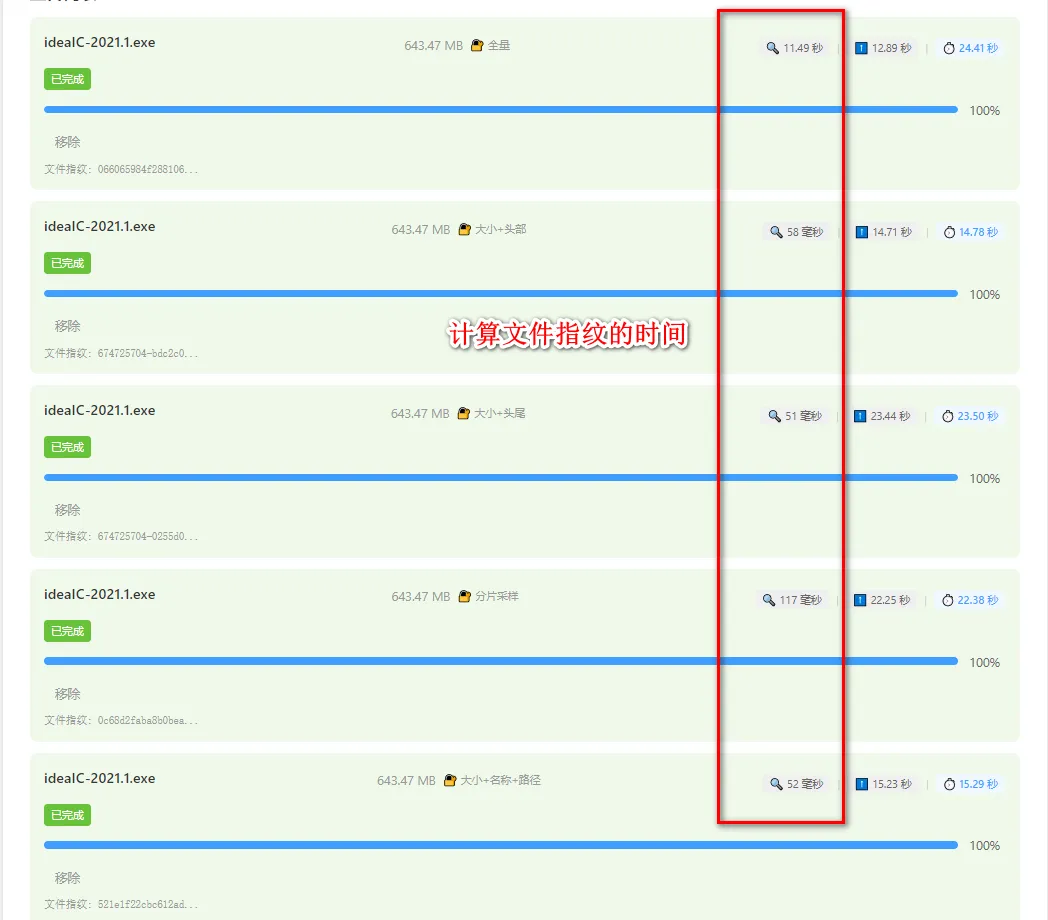
如果对你有用的话,可以打赏哦
打赏


本文作者:繁星
本文链接:
版权声明:本博客所有文章除特别声明外,均采用 BY-NC-SA 许可协议。转载请注明出处!
目录