目录
最近一年AI Agent大火,但很多开发者都陷入了一个误区:疯狂堆砌Agent框架、折腾Prompt工程,却始终解决不了落地的核心痛点——大模型和外部资源的对接太碎片化。
换一个大模型,就要重写一套工具调用逻辑;对接数据库、本地文件、第三方API,每一个场景都要单独写胶水代码。项目小的时候看不出问题,一旦做复杂智能体、企业级AI应用,代码冗余、维护混乱、无法复用的问题直接爆炸。
这也是 MCP(Model Context Protocol,模型上下文协议) 能快速出圈的核心原因。 网上大部分文章只讲概念、吹趋势,很少有人讲透彻:MCP到底是什么、和传统Function Call有什么本质区别、普通人怎么从零手写一个可用的MCP服务。 本篇文章带你认识什么是MCP。
什么是MCP
MCP 全称 Model Context Protocol,即 模型上下文协议 ,起源于 2024 年 11 月 25 日 Anthropic 发布的文章:Introducing the Model Context Protocol,MCP 定义了应用程序和 AI 模型之间交换上下文信息的方式,这使得开发者能够以一致的方式将各种数据源、工具和功能连接到 AI 模型(MCP 并不是什么框架,也不是什么技术的突破,而仅仅一个中间协议层)。
MCP 的目标就是为了创建一个通用的标准,使 AI 应用程序的开发和集成变得更加简单和统一。
MCP 犹如 AI 应用的 “USB-C 端口”,使 LLM 能够通过统一的接口无缝连接至多种数据源和工 具(如文件系统、数据库或外部 API),并且 MCP 基于 JSON-RPC(一种使用 JSON 编码的远程过程调用协议),无论是否是开发者使用起来都非常简单。
MCP 服务三个核心组件
- MCP Hosts:运行 MCP 的主应用程序,例如 Claude Desktop、智能 IDE 或 AI 工具,负责通过MCP 访问外部数据。
- MCP Clients:协议客户端,与服务器建立一对一连接,负责发送请求并接收响应。
- MCP Servers:轻量级程序,通过 MCP 暴露特定功能(如文件读取或 API 调用)。
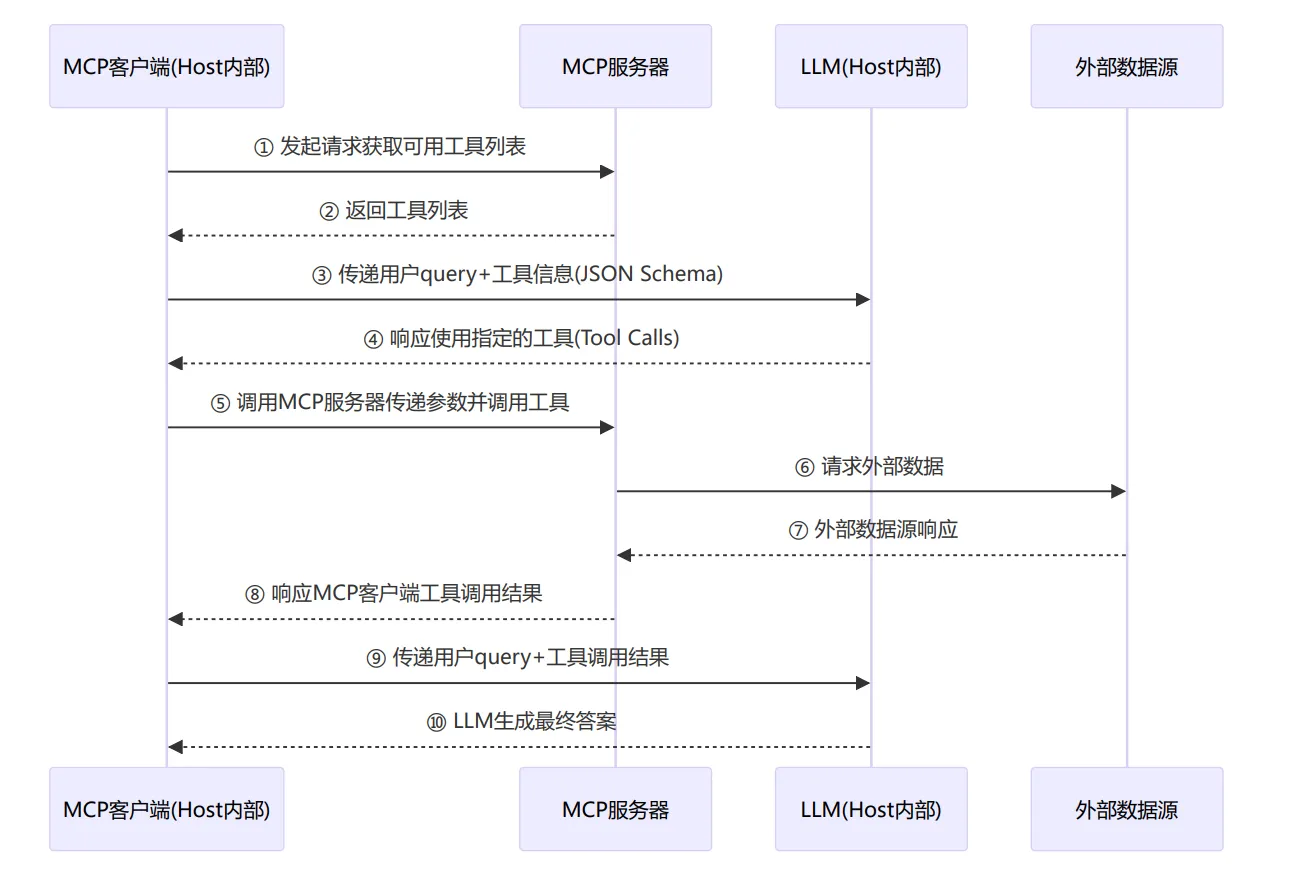
MCP 和 Tool Calls 的区别
Tool Calls 是一种机制,它告知 LLM 有哪些工具可供使用,随后 LLM 根据用户的 Prompt 来决定需要调用哪些特定工具。然而,LLM 本身并不具备直接调用这些工具的能力,这就需要依靠本地代码(传统做法)、MCP host(如 Cursor 或 Cherry Studio 等应用)通过 MCP client 和 MCP server 的交互来实现实际调用。
诚然,即使没有 MCP 也能实现工具调用功能,但这样一来,每种工具的调用方式都需要单独实现,这正是缺乏标准化带来的问题。 以一个具体场景为例:假设你希望 LLM 告诉你未来一周北京的天气情况,你有两个可用的工具: 一个是"获取特定地点和日期的天气信息"(get weather with locations and date) 另一个是"获取当前时间"(get current time)。 在没有 MCP 的情况下,你需要在代码中预先编写如何调用这两个功能,然后在 LLM 需要时分别触发调用。而有了 MCP 之后,你只需配置好相应的 servers,便可通过统一的方式进行调用,区别仅在于传递的参数不同。 包括在 MCP 中,我们也可以通过 tools/list 指令获取 MCP Servers 提供的所有工具的描述信息,并将这些信息组装成 Tool Calls 的格式,或者以 prompt 的形式让 LLM 格式化输出实现工具调用(Claude官方示例代码的做法,严重依赖 LLM 的能力)。
- MCP 是一个抽象层面的协议标准。它规定了上下文与请求的结构化传递方式,并要求通信格式符合 JSON-RPC 2.0 标准。
- Tool calls 则是某些大模型提供的特有接口特性,当然目前绝大部分模型该接口均兼容 OpenAI。
应用可以选择在 MCP 之上通过特定机制(包括 Tool calls)与模型交互,也可以在 MCP 范式下使用其他不基于 Tool calls 的方式(例如使用 Prompt)与模型或数据源交互。
MCP架构解析
MCP 请求&响应消息格式
MCP 客户端和服务器之间的所有消息必须遵循 JSON-RPC 2.0 规范,并且在协议中定义了四类消息类型:
① 请求(Requests)
请求从 Client 发送到 Server,或者从服务器发送到客户端,用于启动操作,数据格式如下:
{
    jsonrpc: "2.0"
    id: string | number
    method: string
    params?: {
        [key: string]: unknown
    }
}
- 请求必须包含字符串或整数 ID。
- 与基本 JSON-RPC 不同,ID 不得为 null 。
- 请求 ID 不得在同一会话中被请求者先前使用过(不过现实服务中,大部分没这类要求)。
② 响应(Responses)
响应是对请求的回复,包含操作的结果或错误,数据格式如下:
{
    jsonrpc: "2.0";
    id: string | number;
    result?: {
        [key: string]: unknown;
    }
    error?: {
        code: number;
        message: string;
        data?: unknown;
    }
}
- 响应必须包含与其对应请求相同的 ID。
- 响应进一步分为成功结果或错误。必须设置 result 或 error 中的一个。响应不得同时设置两 者。
- 结果可以遵循任何 JSON 对象结构,而错误必须至少包含错误代码和消息。
- 错误代码必须是整数。
③ 通知(Notifications)
通知从客户端发送到服务器,或者从服务器发送到客户端,作为单向消息。接收方不得发送响应,数据 格式如下:
{
    jsonrpc: "2.0";
    method: string;
    params?: {
        [key: string]: unknown;
    };
}
- 通知不得包含 ID。
④ 批处理(Batching)
JSON-RPC 还定义了批量处理多个请求和通知的方法,将它们放在一个数组中发送。MCP 实现可以支持 发送 JSON-RPC 批处理,但必须支持接收 JSON-RPC 批处理(具体是否支持看对应的 MCP 服务商),数据格式如下:
Array<{
    jsonrpc: "2.0";
    id: string | number;
    method: string;
    params?: {
        [key: string]: unknown;
    };
}>
在当前最新版协议中 2026-07-28版 有了一些变化:
关于授权认证:核心授权框架基于 OAuth 2.1,授权属于可选项 (OPTIONAL),不是所有 MCP 服务都必须开启认证。
MCP 将认证规则按传输通道完全分开,三种传输通道认证方案互不通用
MCP 将认证规则按传输通道完全分开,三种传输通道认证方案互不通用Model Cont...
表格
| 传输类型 | 授权方案规定 |
|---|---|
| Stdio(子进程本地服务器) | 禁止使用 MCP OAuth 授权流程;凭据从**环境变量 (env)**传入,例如 API‑Key、Bearer Token |
| HTTP / Streamable‑HTTP / SSE(远程网络服务) | **应当 (SHOULD)**实现 MCP OAuth 2.1 授权规范,Bearer Token 放 HTTP Header |
| 其他自定义传输 | 自行遵循对应传输安全最佳实践 |
新版无状态规范 (2026‑07‑28) 已经彻底删除会话 ID
Mcp‑Session‑Id,不再有会话绑定令牌,每一条 HTTP 请求都必须独立带上 Authorization 头,无粘性会话要求。
MCP声明周期
了解了 MCP Client 和 Server 之间通信的消息格式,在正式使用 MCP 服务之前,我们还有必要了解下MCP 的生命周期,在 2025-06-18 版本中,MCP 为 Client-Server 定义了严格的生命周期(实际上不严格),确保适当的能力协商和状态管理,总共可以划分成 3 个阶段:
1.初始化: 能力协商和协议版本约定,亦或者初始化会话id(类似双方自我介绍);
2.操作: 正常协议通信,例如 `获取工具列表`、`调用指定工具`、`批处理` 等(类似我说你做)。
3.关闭: 连接的优雅终止(类似友好分手)。
⚠️ 注意:Streamable‑HTTP 无状态新模式(2026‑07‑28)打破这套生命周期,无 initialize 握手,后文会单独对比。
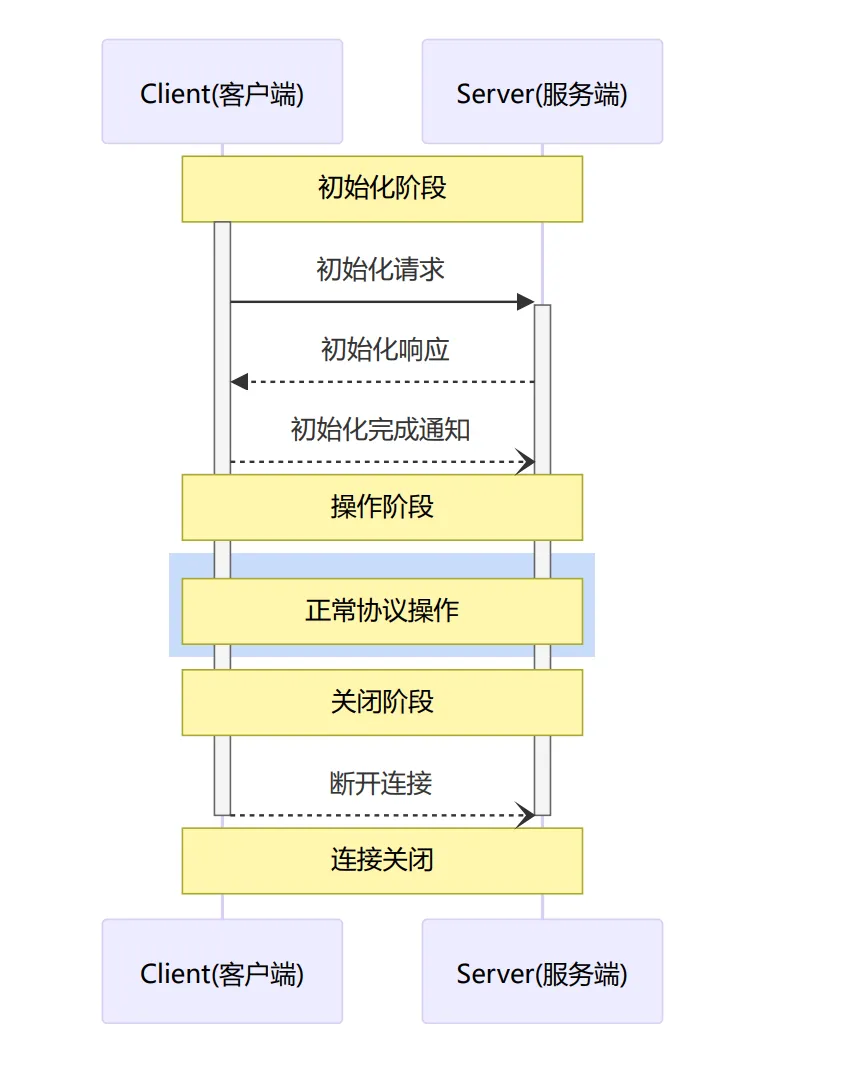
在初始化阶段,客户端必须使用 JSON-RPC 标准发送包含 initialize 的数据来启动此阶段,告知服务 端客户端具备的能力,涵盖:支持的协议版本、客户端能力、客户端等信息(完整信息查看:https://m odelcontextprotocol.io/specification/2025-06-18/basic/lifecycle#capability-negotiation)
json{
  "jsonrpc": "2.0",
  "id": 1,
  "method": "initialize",
  "params": {
    "protocolVersion": "2025-06-18",
    "capabilities": {
      "roots": {
        "listChanged": true
      },
      "sampling": {},
      "elicitation": {}
    },
    "clientInfo": {
      "name": "ExampleClient",
      "title": "Example Client Display Name",
      "version": "1.0.0"
    }
  }
}
在接收到客户端的初始化请求后,服务端必须响应其自身的能力和信息:
json{
  "jsonrpc": "2.0",
  "id": 1,
  "result": {
    "protocolVersion": "2025-06-18",
    "capabilities": {
      "logging": {},
      "prompts": {
        "listChanged": true
      },
      "resources": {
        "subscribe": true,
        "listChanged": true
      },
      "tools": {
        "listChanged": true
      }
    },
    "serverInfo": {
      "name": "ExampleServer",
      "title": "Example Server Display Name",
      "version": "1.0.0"
    },
    "instructions": "Optional instructions for the client"
  }
}
同时在初始化成功之后,客户端必须发送 initialized 通知以表示其已准备好开始正常操作:
json{
  "jsonrpc": "2.0",
  "method": "notifications/initialized"
}
阶段 2:Operation 运行阶段(就绪后)
会话就绪,双向全功能通信,有状态会话上下文在连接期间保留。 可执行:
- Client 主动调用:
tools/list/tools/call/resources/list/prompts/get - Server 反向请求 Client:sampling(请求大模型生成)、elicitation 用户输入弹窗
- 双向通知流:资源变更、工具列表变更、进度更新、日志
- 异步长任务子生命周期:任务启动 → 进度通知 → completed /failed/cancelled
- 支持
notifications/cancelled取消正在执行中的请求
阶段 3:Shutdown 关闭阶段
❗ MCP 协议层没有专门 shutdown RPC 报文。
关闭完全由传输层断开触发,不同传输通道行为不一样:
| 传输方式 | 关闭方式 |
|---|---|
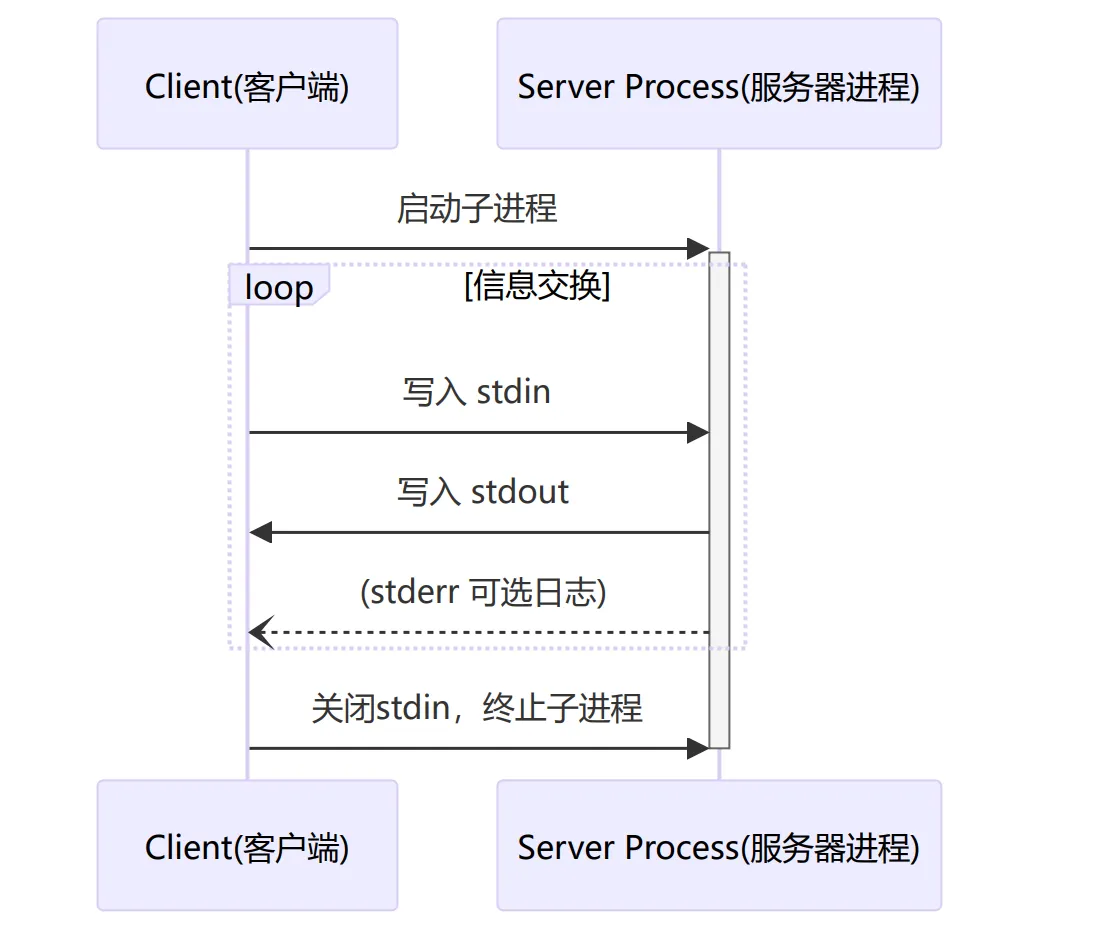
| Stdio(子进程) | 客户端关闭 stdin;进程收到 EOF;随后进程退出。超时可发送 SIGTERM/SIGKILL |
| SSE(旧版 HTTP 会话) | 旧规范:DELETE /session 携带 Mcp‑Session‑Id;关闭 SSE 流 |
断开后:
- 会话销毁,所有会话临时状态、订阅、上下文全部丢弃
- 如需再次通信,必须重新建立一条全新会话 + 完整初始化握手
新旧两套生命周期模型对比(关键区分)
| 项目 | 传统有状态生命周期(Stdio / SSE,2025‑06‑18) | 新版 Streamable‑HTTP 无状态 (2026‑07‑28) |
|---|---|---|
| initialize 握手 | ✅ 必须 | ❌ 彻底移除,无会话概念 |
| 会话生命周期 | 一条长连接对应一个会话,一次初始化,多次请求 | 每一条 HTTP 请求独立,自包含元数据,无长会话 |
| 能力协商 | 会话启动一次性协商 | 每次请求可携带元数据;运行时动态生效 |
| 传输层 | 长连接绑定会话 | 短连接 / 流式均可,无粘性会话 |
| 认证 | 会话建立时完成 | 每个 HTTP 请求独立携带 Bearer Token |
MCP 的两种传输机制
了解完 MCP 协议的生命周期、消息格式,接下来我们在来补齐 MCP 开发的最后一块版图——通信传输 机制,也就是这些消息怎么传递过去,目前 MCP 定义了两种标准的客户端-服务器通信传输机制。
① 标准输入输出(stdio):基于操作系统提供的标准输入和标准输出机制实现,例如常见的命令行程序,就是通过标准输入向程序传递指令和程序,通过标准输出返回处理结果,更适合用于 本地小工具集成 、处理个人隐私数据 、 快速做功能Demo看效果 等。
② 可流式HTTP(Streamable-HTTP):基于 HTTP 协议的流式传输协议,允许数据以流的形式在客户端和服务器之间传输,而不需要一次性将所有数据加载完成(简单理解就是云端 API),更适合用于 生产环境 、 分布式系统 和 无状态服务架构 等场景。
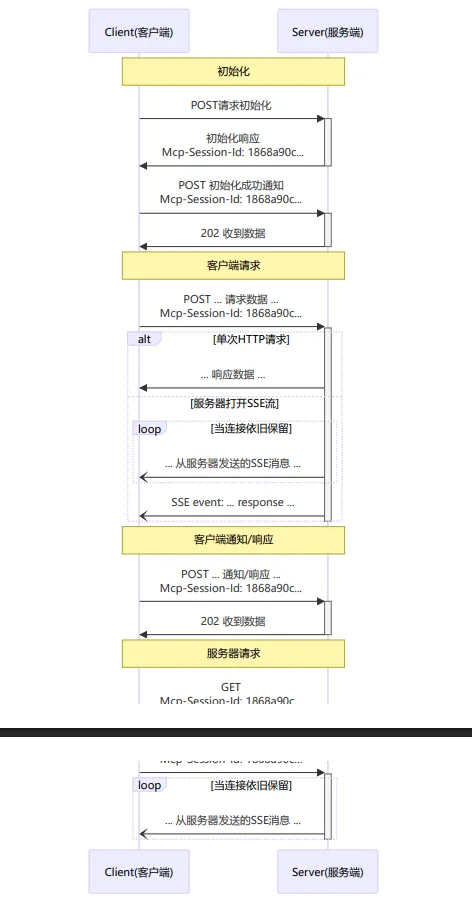
- 初始化请求发起后,收到的响应头中会携带 mcp-session-id ,这个字段可以用于标识某次会话的持续性(服务端有状态),所以需要客户端额外发起一次 通知 ,告诉服务端,我准备好了;
- 因为是可流式 HTTP(GET+POST),所以如果操作请求一次响应能完成(例如查询天气),则一次后 会关闭;否则会像 SSE 一样一直传输数据(例如 LLM 每次输出输出);
demo演示
旧版本
服务端
python#!/usr/bin/env python
# -*- coding: utf-8 -*-
import json

from mcp.server.fastmcp import FastMCP

mcp = FastMCP()


@mcp.tool()
async def calculator(expression: str) -> str:
    """一个数学计算器,用于计算传递的Python数学表达式
    Args:
        expression: 符合Python eval()函数调用的数学表达式
    Returns:
        表达式的计算结果
    """
    try:
        result = eval(expression)
        return json.dumps({"result": result})
    except Exception as e:
        return json.dumps({"result": f"数学表达式计算出错: {str(e)}"})


if __name__ == "__main__":
    mcp.run(transport="stdio")
客户端
python#!/usr/bin/env python
# -*- coding: utf-8 -*-
import asyncio

from mcp import StdioServerParameters, ClientSession
from mcp.client.stdio import stdio_client


async def main() -> None:
    # 1.初始化stdio的服务器连接参数
    server_params = StdioServerParameters(
        command="uv",
        args=[
            "--directory",
            "D:\\Code\\imooc-mas\\mas-study",
            "run",
            "6_6_mcp-server-demo.py",
        ],
        env=None,
    )

    # 2.创建标准输入输出客户端
    async with stdio_client(server_params) as transport:
        # 3.获取写入和写出流
        stdio, write = transport

        # 4.创建客户端会话上下文
        async with ClientSession(stdio, write) as session:
            # 5.初始化mcp服务器连接
            await session.initialize()

            # 6.获取工具列表信息
            list_tools_response = await session.list_tools()
            tools = list_tools_response.tools
            print("工具列表:", [tool.name for tool in tools])

            # 7.调用指定的工具
            call_tool_response = await session.call_tool("calculator", {"expression": "564*34+12.4/455**2"})
            print("工具结果:", call_tool_response)


if __name__ == "__main__":
    asyncio.run(main())
新版(2026-07-28)
服务端
python#!/usr/bin/env python3
"""
MCP Server Demo
Stdio 模式,对外暴露一个加法工具 add
"""
import asyncio
from mcp.server import Server
from mcp.types import (
    Tool,
    TextContent
)

# 创建服务端实例
server = Server("demo-mcp-server")


# 注册工具:加法
@server.tool()
async def add(a: float, b: float) -> str:
    """
    两个数字相加
    Args:
        a: 数字1
        b: 数字2
    Returns:
        相加结果字符串
    """
    res = a + b
    return f"计算结果: {a} + {b} = {res}"


async def main():
    # 使用 stdio 标准输入输出传输层运行服务
    from mcp.server.stdio import stdio_server
    async with stdio_server() as (read_stream, write_stream):
        await server.run(
            read_stream,
            write_stream,
            server.create_initialization_options()
        )


if __name__ == "__main__":
    asyncio.run(main())
客户端
#!/usr/bin/env python3
"""
MCP Client Demo
启动子进程运行上面的 server.py,完成完整生命周期:
initialize → initialized通知 → 列出工具 → 调用add工具 → 关闭
"""
import asyncio
from mcp.client.session import ClientSession
from mcp.client.stdio import stdio_client, StdioServerParameters


async def main():
    # 子进程启动 mcp server
    server_params = StdioServerParameters(
        command="python",
        args=["server.py"],
        env=None
    )

    async with stdio_client(server_params) as (read_stream, write_stream):
        async with ClientSession(read_stream, write_stream) as session:
            # ========= 1. initialize 握手 =========
            init_result = await session.initialize()
            print("✅ 初始化完成,服务端信息:")
            print(f"   server name: {init_result.serverInfo.name}")
            print(f"   server version: {init_result.serverInfo.version}")
            print(f"   server capabilities: {init_result.capabilities}")

            # ========= 2. 发送 initialized 通知 (会话就绪) =========
            await session.send_initialized_notification()

            # ========= 3. 获取工具列表 =========
            tools_result = await session.list_tools()
            print("\n📋 可用工具列表:")
            for tool in tools_result.tools:
                print(f" - name: {tool.name}, desc: {tool.description}")

            # ========= 4. 调用 add 工具 =========
            call_result = await session.call_tool("add", arguments={"a": 10, "b": 25})
            print("\n🔧 工具调用返回内容:")
            for content in call_result.content:
                if isinstance(content, TextContent):
                    print(content.text)

            # 会话退出,上下文管理器自动关闭连接、终止子进程


if __name__ == "__main__":
    asyncio.run(main())
MCP外挂 bash工具和代码解释器
旧版本写法(2025-06-18)
mcp_bash
python#!/usr/bin/env python
# -*- coding: utf-8 -*-
"""
@Time    : 2025/5/26 10:37
@Author  : thezehui@gmail.com
@File    : 6_8_mcp-bash.py
"""
import subprocess

from mcp.server.fastmcp import FastMCP

mcp = FastMCP(name="Bash工具")


@mcp.tool()
async def bash(command: str) -> dict:
    """传递command命令,在Windows下执行CMD命令。

    Args:
        command: 需要执行的command命令

    Returns:
        返回命令的执行状态、结果、错误信息
    """
    result = subprocess.run(
        command,
        shell=True,  # 让命令行通过cmd执行
        capture_output=True,  # 捕获输出
        text=True,  # 输出解码为字符串
    )

    return {
        "returncode": result.returncode,
        "stdout": result.stdout,
        "stderr": result.stderr
    }


if __name__ == "__main__":
    mcp.run(transport="stdio")
mcp_code
python#!/usr/bin/env python
# -*- coding: utf-8 -*-
"""
@Time    : 2025/5/26 11:07
@Author  : thezehui@gmail.com
@File    : 6_9_mcp-code.py
"""
import os
import subprocess
import uuid

from mcp.server.fastmcp import FastMCP

mcp = FastMCP(name="代码解释器", port=9888)
BASE_DIR = "D:\Code\imooc-mas\mas-study"
UV_CMD = "uv"


@mcp.tool()
async def run_code(language: str, code: str, timeout: int = 30) -> str:
    """根据语言运行代码并返回执行结果,Python代码会使用D:\Code\imooc-mas\mas-study中uv创建的Python 3.12版本运行。

    Args:
        language: 'python' 或者 'node'
        code: 要执行的代码文本
        timeout: 最长运行描述(默认为30s)

    Returns:
        执行输出(stdout)或错误信息(stderr/异常)
    """
    # 1.检查传递的编程语言是否符合规则
    language = (language or "").strip().lower()
    if language not in ("python", "node"):
        return f"不支持的语言: {language}"

    # 2.计算获取临时代码文件名
    suffix = ".py" if language == "python" else ".js"
    name = f"temp_{uuid.uuid4().hex}{suffix}"
    tmp_path = os.path.join(BASE_DIR, name)

    # 3.确保目录存在
    os.makedirs(BASE_DIR, exist_ok=True)

    try:
        # 4.写入临时文件
        with open(tmp_path, "w", encoding="utf-8") as f:
            f.write(code)

        # 5.判断不同的语言类型执行不同的操作
        cwd = BASE_DIR
        if language == "python":
            # 6.使用uv来运行对应的文件
            cmd = [UV_CMD, "--directory", BASE_DIR, "run", name]
        else:
            # 7.使用node命令运行脚本
            cmd = ["node", tmp_path]

        # 8.调用子线程运行对应命令
        proc = subprocess.run(
            cmd,
            capture_output=True,
            text=True,
            timeout=timeout,
            cwd=cwd,
        )

        # 9.获取输出与错误结果
        stdout = proc.stdout.strip()
        stderr = proc.stderr.strip()

        # 10.判断状态码
        if proc.returncode == 0:
            return stdout
        else:
            return f"命令返回非零状态 {proc.returncode}, stderr: \n{stderr or stdout}"
    except subprocess.TimeoutExpired:
        return f"执行超时(>{timeout}s)"
    except FileNotFoundError as e:
        return f"命令未找到活路径错误: {str(e)}"
    except Exception as e:
        return f"执行异常: {str(e)}"
    finally:
        # 尝试删除临时文件(并且忽略错误)
        try:
            if os.path.exists(tmp_path):
                os.remove(tmp_path)
        except Exception:
            pass


if __name__ == "__main__":
    mcp.run(transport="streamable-http")
新版本写法(2026-07-28)
mcp_bash
python#!/usr/bin/env python
# -*- coding: utf-8 -*-
from __future__ import annotations

import os
import shlex
import subprocess

from mcp.server.mcpserver import MCPServer

mcp = MCPServer("Bash工具")


@mcp.tool()
def bash(command: str, timeout: int = 30) -> dict[str, object]:
    command = (command or "").strip()
    if not command:
        return {"returncode": 1, "stdout": "", "stderr": "command is empty"}

    try:
        args = shlex.split(command, posix=(os.name != "nt"))
        result = subprocess.run(
            args,
            shell=False,
            capture_output=True,
            text=True,
            timeout=timeout,
        )
        return {
            "returncode": result.returncode,
            "stdout": result.stdout,
            "stderr": result.stderr,
        }
    except subprocess.TimeoutExpired:
        return {"returncode": 124, "stdout": "", "stderr": f"timeout after {timeout}s"}
    except FileNotFoundError as exc:
        return {"returncode": 127, "stdout": "", "stderr": str(exc)}
    except Exception as exc:
        return {"returncode": 1, "stdout": "", "stderr": str(exc)}


if __name__ == "__main__":
    mcp.run(
        transport="streamable-http",
        host="127.0.0.1",
        port=9877,
        stateless_http=True,
        json_response=True,
    )
mcp_code
python#!/usr/bin/env python
# -*- coding: utf-8 -*-
from __future__ import annotations

import subprocess
import sys
import tempfile
import uuid
from pathlib import Path

from mcp.server.mcpserver import MCPServer

mcp = MCPServer("代码解释器")


def _run_python(code: str, timeout: int) -> dict[str, object]:
    with tempfile.TemporaryDirectory() as tmpdir:
        tmp_path = Path(tmpdir) / f"temp_{uuid.uuid4().hex}.py"
        tmp_path.write_text(code, encoding="utf-8")
        proc = subprocess.run(
            [sys.executable, str(tmp_path)],
            capture_output=True,
            text=True,
            timeout=timeout,
        )
        return {
            "returncode": proc.returncode,
            "stdout": proc.stdout,
            "stderr": proc.stderr,
        }


def _run_node(code: str, timeout: int) -> dict[str, object]:
    with tempfile.TemporaryDirectory() as tmpdir:
        tmp_path = Path(tmpdir) / f"temp_{uuid.uuid4().hex}.js"
        tmp_path.write_text(code, encoding="utf-8")
        proc = subprocess.run(
            ["node", str(tmp_path)],
            capture_output=True,
            text=True,
            timeout=timeout,
        )
        return {
            "returncode": proc.returncode,
            "stdout": proc.stdout,
            "stderr": proc.stderr,
        }


@mcp.tool()
def run_code(language: str, code: str, timeout: int = 30) -> dict[str, object]:
    language = (language or "").strip().lower()
    if language == "python":
        return _run_python(code, timeout)
    if language == "node":
        return _run_node(code, timeout)
    return {
        "returncode": 1,
        "stdout": "",
        "stderr": f"unsupported language: {language}",
    }


if __name__ == "__main__":
    mcp.run(
        transport="streamable-http",
        host="127.0.0.1",
        port=9888,
        stateless_http=True,
        json_response=True,
    )


本文作者:繁星
本文链接:
版权声明:本博客所有文章除特别声明外,均采用 BY-NC-SA 许可协议。转载请注明出处!